
Wan 3.0 Prompt Guide: References, Documents, and 30-Second Shots
How to write Wan 3.0 prompts for text, start and end frames, named image, video, and audio references, documents, and webpages, with copy-ready templates.
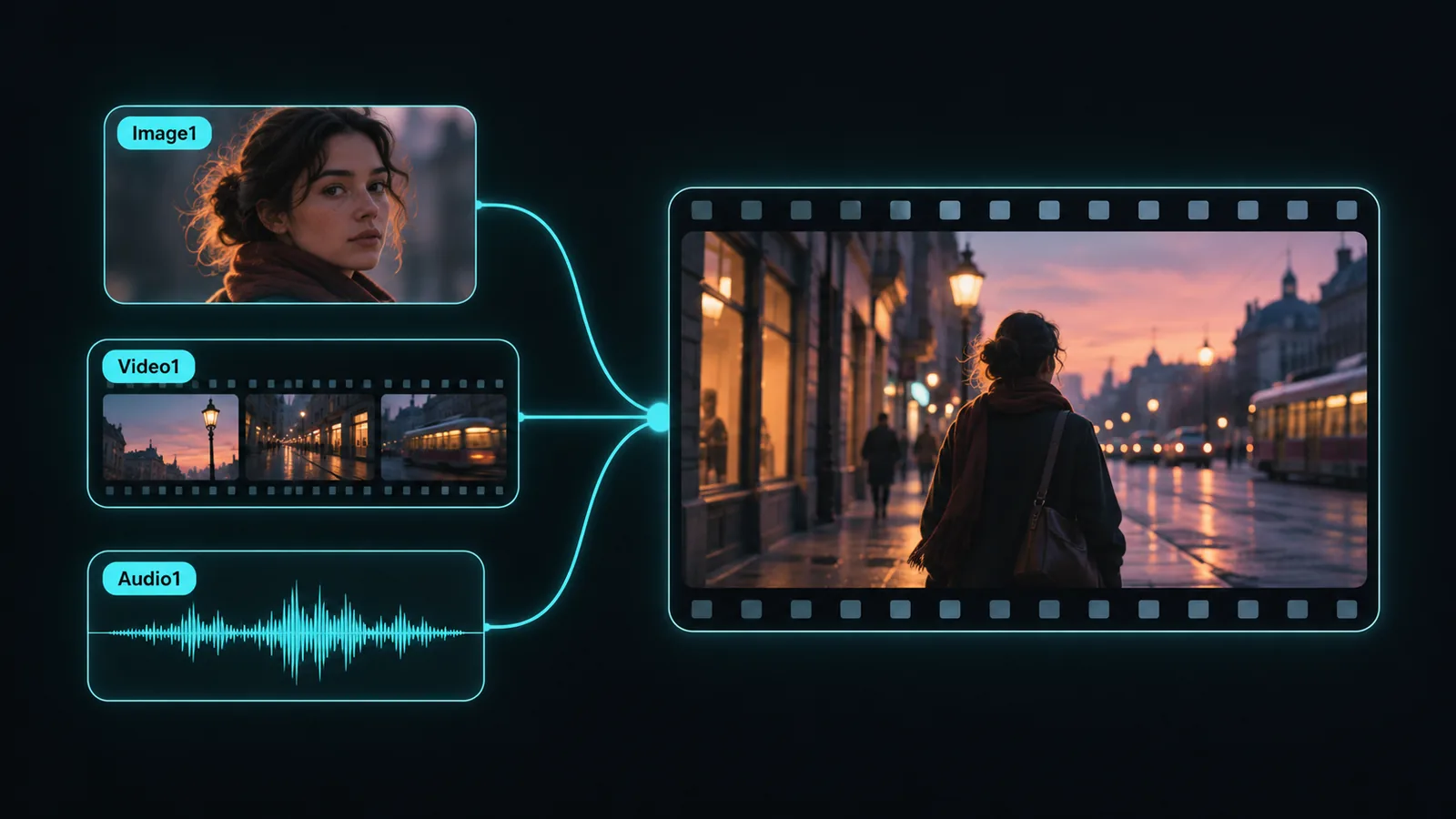
A Wan 3.0 prompt has two jobs. It has to describe one shot clearly enough to be staged: who is in it, what changes, how the camera watches, what it sounds like, and where it ends. And when you attach files, it has to say what each file is for. The second job is the easy one to skip, and then the model has to guess what each file should control.
The order that holds up across workflows is:
Subject → action → setting → camera movement → lighting → style → ending state → audio → exclusions
With references, add one more layer on top: name every file by its number (Image1, Video1, Audio1) and give it exactly one responsibility.
This guide covers the four input routes in Videoify's Wan 3.0 generator: text to video, start and end frames, reference to video, and a document or webpage as context. The templates are starting points, not promises of identical output. Every generation is a draft you watch with sound, check, and revise.
Pick the input route before you write
The route decides what the prompt has to carry. Choose it based on what you already have:
- Text to video. You have no required image. The prompt carries everything: subject, setting, action, camera, look, sound, and the final frame.
- Frames. You have an approved opening image, an approved closing image, or both. The prompt describes the motion and camera path between them, not what the frames already show.
- Reference to video. A face, a product, a location, a movement, or a beat must come from existing media. The prompt assigns a role to each file and describes the new scene.
- Document or webpage as context. Use a document when the brief already exists as a deck, spec sheet, script, or report, or a webpage when the message lives on a public product or campaign page. The prompt says which part matters, who the video is for, how it should look, and what to leave out.
Frames and reference media are separate routes. You cannot pin a first frame and attach reference images in the same generation, so decide whether the shot is defined by its endpoints or by its references.
Output settings live in the interface, not the prompt. On Videoify, Wan 3.0 renders 2 to 30 whole seconds at 480P, 720P, or 1080P, in adaptive, 16:9, 4:3, 1:1, 3:4, or 9:16 framing. Native audio is on by default and can be switched off. Write the prompt to direct what happens inside the duration and frame you picked.
Build the prompt in the same order every time
Wan 3.0 does not need special syntax. It responds to plain production language. A fixed order makes your own prompts easier to check before you spend credits, and easier to compare after a weak result.
Give the shot one job
Before writing any detail, decide what the clip must accomplish in one line: "Show the noodle vendor's flame toss and land on her looking up." "Reveal the kettle and finish on a clean product angle." Anything in the prompt that does not serve that job is noise the model still has to interpret.
Write action in playback order
"A moody dancer in a studio" is a still image. "A dancer hits each accent of a slow house beat with her shoulders, then turns toward the mirror" gives the model events to stage. Use verbs a viewer can see, in the order they happen. Say what changes during the clip instead of describing a frame that already exists.
Give the camera a destination
"Dynamic camera" leaves both the movement and the final framing open. Name the starting shot, one movement, its speed, and where it stops:
Static wide for four seconds, then a smooth orbit toward the mirror side, settling on a medium shot of her reflection.
One dominant movement per shot is easier to get right than three combined ones. If you need more camera vocabulary, the AI video camera prompts guide lists the common moves and what each one implies.
Describe light through a source
"Cinematic lighting" is too broad to act on. Name a source and a direction: "afternoon light through dusty blinds," "one hanging bulb, chalk dust in the beam," "cool window light from camera left, warm lamp behind." Physical sources give the model relationships it can keep stable across the clip.
State the style outright
If you want a 2D cartoon, hand-drawn animation, or an anamorphic film look, say so in those words near the start of the prompt: "Hand-drawn 2D cartoon, bold outlines, flat color, light film grain." A prompt that only implies a style through the subject (a cartoon raccoon, say) can still come back photoreal.
Write sound where it happens
Audio is generated in the same pass as the picture, so treat it as part of the action rather than a tag at the end. "Punches land in time with the audio: leather, chain rattle, breath" is more useful than "realistic sound effects." For dialogue, write the exact line, who says it, and when. If you do not want music or speech, say "no music" or "no dialogue" explicitly.
End on a usable frame
The last second of a generated clip is often the one you cut on. Ask for something to settle: a gesture completes, the camera holds, the product reaches a readable angle. Then close with what you do not want: "No subtitles, no extra people, no on-screen text."
Keep exclusions short and specific. A long list of "no bad quality, no artifacts, no weird motion" competes with the scene itself and does not tell the model anything it can act on.
Write long clips as beats, not adjectives
Wan 3.0 can generate up to 30 seconds in one pass. That length only helps when the prompt gives it somewhere to go. Stretching a five-second action across half a minute leaves the model to invent what fills the extra time, so pick the duration the action needs.
Once a clip runs past about ten seconds, write it as a short beat-by-beat timeline instead of adding more description. Each beat answers three questions: what changes, where the camera is, and what sound marks the moment. A 20-second example:
20 seconds, 16:9, one continuous take. A lighthouse keeper in a navy wool sweater climbs an iron spiral staircase at dawn, coffee in one hand.

0–6s: Low angle from the bottom of the stairs. He climbs steadily; boots ring on the iron steps.
6–13s: The camera follows him up, rising alongside the railing. Grey light grows stronger through the small windows.
13–18s: He pushes open the lamp-room door. The camera eases through the doorway behind him onto grey sea and wheeling gulls.
18–20s: He stops at the glass and sips the coffee. The camera holds on a wide view of the sea with him in silhouette on the right.

Audio: footsteps on iron, wind rising when the door opens, gulls, the low hum of the lamp. No music, no dialogue, no cuts.
This is a planning pattern, not a required format. A quiet eight-second shot does not need timestamps.
Prompts can run up to 20,000 characters in English or Chinese. That ceiling is for long timelines and detailed multi-shot scenes, not an invitation to stack adjectives. A tight paragraph usually beats a long one.
Reference to video: name every file
Reference to video is where Wan 3.0 is most different from a prompt-only model, and where the prompt matters most. Files are numbered in the order you attach them, and you address them by those numbers: Image1, Image2, Video1, Audio1. "Keep Image1's face, follow Video1's walk" is far more reliable than "use the references."
The limits on Videoify:
- Up to 10 reference images.
- Up to 5 reference videos, totaling no more than 15 seconds.
- Up to 5 audio files, totaling no more than 15 seconds.
- Reference video length plus output length must stay within 30 seconds.
Capacity is not a target. Start with the smallest set that establishes what you need, and give each file one job:
- Image of a person: face, hair, wardrobe, proportions. Say which traits must not change.
- Image of a product: shape, material, color, packaging. Say which angle or markings matter.
- Image of a place: layout, architecture, palette. Say whether people in the photo should appear.
- Video: motion, performance timing, or camera path. Say what to copy and what subject or setting to ignore.
- Audio: rhythm, pace, or ambience. Say whether it should drive the timing or be heard in the result.
Conflicting references are an unresolved decision handed to the model. If three images show three different jackets, pick one as the identity source and say the others supply only pose or location.
A template:
Use Image1 for [the character's face, hair, and wardrobe].
Use Image2 for [the location layout and light].
Use Video1 only for [the walking pace and camera path]. Do not copy the person or setting from Video1.

[Subject from Image1] [action] in [setting from Image2].
Camera: [shot plan]. Look: [light, palette, style].
Audio: [ambience, effects, dialogue or none].
End with [stable final state]. Keep [traits] from Image1 unchanged.
Three patterns that come up often:
Keep a character across new scenes. Start with one clean, well-lit image of the character, and add a second angle only if the face drifts. "Keep Image1's face, hair, and green coat. She crosses a rain-slick market at night, stops at a stall, and looks up at the camera." No training run or LoRA is involved; the image does the work.
Dance or move to a track. Attach the song as Audio1 and tie the movement to it: "The dancer hits every accent in Audio1 with her shoulders and hips; steps stay locked to the beat." Audio works best alongside an image or a video that defines who is dancing, rather than as the only reference.
Re-angle a performance. Attach a continuous action clip as Video1 and change only the camera: "Keep Video1's performance exactly as shot. Re-frame as a slow side track at shoulder height, then a close-up on her hands at 3s." This is the closest thing to coverage from a second camera, generated from one take.
When you attach reference videos, their durations are added together, the total is rounded up to the next whole second, and that is billed on top of the output duration. A 5.2-second reference with a 10-second output is billed as 16 seconds. The exact cost shows before you generate.
Frames: describe the path, not the picture
The image already defines what the shot looks like. Repeating its contents back to the model wastes the prompt. Describe the change instead:
Begin from the start frame. The wheel keeps turning and the hands draw the clay upward into a tall neck, thinning the wall as they rise. Camera locked off, shallow depth of field held. Wet clay and a low motor hum in the audio. No extra hands, no cuts.
With both a start and an end frame, describe the intermediate actions that connect them and what must match at the end. If the two frames disagree on perspective, lighting, or room layout, the model has several discontinuities to solve at once; pick closer endpoints or split the move into two clips.
If the start frame is a cartoon or illustration, say "keep the hand-drawn cartoon look, no photoreal conversion." Otherwise the motion can pull the style toward realism.
Documents and webpages: tell the model what to take
Wan 3.0 is the first model in the Wan family that reads documents and web pages as input, according to Alibaba Cloud's launch post. On Videoify you can attach one document (PDF, Word, PowerPoint, Excel, Keynote, Pages, Numbers, Markdown, or TXT, up to 100 MB and 50 pages) or one public http(s) webpage. Sign-in pages and private links are not supported.
The document supplies facts and wording, not a shot plan. Left on its own, a 40-page deck gives the model too many possible videos. The prompt narrows it down:
- Which part: "Use the three product benefits on page 4" or "the launch announcement at the top of the page."
- Audience and length: "A 20-second vertical teaser for existing customers."
- Visual direction: setting, style, camera, and pace, the same as any other prompt.
- What to leave out: "Ignore the pricing table and the legal footer."
A webpage template:
Turn the product page into a 15-second 9:16 launch teaser. Use the headline message and the three feature callouts; ignore the pricing section, reviews, and navigation. Show the product on a clean studio set, one slow push in per feature. Warm key light, white background. Upbeat percussion, no voiceover. End on the product centered with empty space at the top for a title.
Keep on-screen text to a word or two. Alibaba notes that on-screen text rendering is still improving, so a long slogan is safer added in an editor afterward. Leaving clean space for it in the last frame, as above, makes that easier.
When a result misses, change one thing
Do not rewrite the whole prompt after one weak result. Watch the clip with sound, find the first moment it leaves the brief, and fix the part of the prompt that controls that moment:
- The ending drifts. The final state is missing or the last beat has too many actions. Describe the final frame explicitly and give it time.
- The action feels rushed. Too many events for the duration. Drop a secondary event or lengthen the beat that carries the main one.
- The style comes back photoreal. The style was implied, not stated. Put the style words first.
- A reference is ignored or mixed up. The prompt did not name it, or two files claim the same job. Name each file and remove the conflict.
- Unwanted elements from a reference video appear. Say what not to transfer: "Do not copy the person or background from Video1."
- Text is garbled. Shorten it to a word, or remove it and add text in an editor.
The variation seed helps here. Generate with a fixed seed, change one line of the prompt, and generate again with the same seed. The difference between the two clips is easier to attribute to your edit than when both the seed and the prompt change.
Generation keeps running if you leave the page, and a failed generation returns its credits automatically. Every finished clip is billed, kept or not, so test cheaply: at 2 credits per second, a short 480P draft checks timing and motion for a quarter of the 1080P rate before you render the final take.
A final check before generating
- The route matches what you have: frames or references, not both.
- The prompt states one job for the shot.
- Actions are in playback order, with one main camera movement and a destination.
- The style is named outright if it is not photoreal.
- Sound is written where it happens; "no music" or "no dialogue" is explicit if you want silence.
- Every attached file is named by number and given one role.
- Long clips have beats; short clips do not need them.
- The last frame is something you could cut on.
- Exclusions are short and specific.
Then open the Wan 3.0 generator, set the duration and resolution, and run it.
Sources
- Wan3.0: 30-Second AI Video Generation from Any Input, Alibaba Cloud, August 13, 2026. Model capabilities, document input, and the note on on-screen text.
- Videoify's Wan 3.0 page: input routes, limits, settings, and credit rates on this site, checked November 14, 2026.